XLOOKUP
Run in a real sheetLooks up a value and returns a matching one from any other range — in any direction, with a built-in fallback.
XLOOKUP(search_key, lookup_range, result_range, [missing_value], [match_mode], [search_mode])
XLOOKUP is the modern replacement for VLOOKUP. You hand it the column to search and the column to return as two separate ranges, so it can look left as easily as right, and inserting a column cannot break it.
It also takes a not-found value directly, which removes the usual IFERROR wrapper.
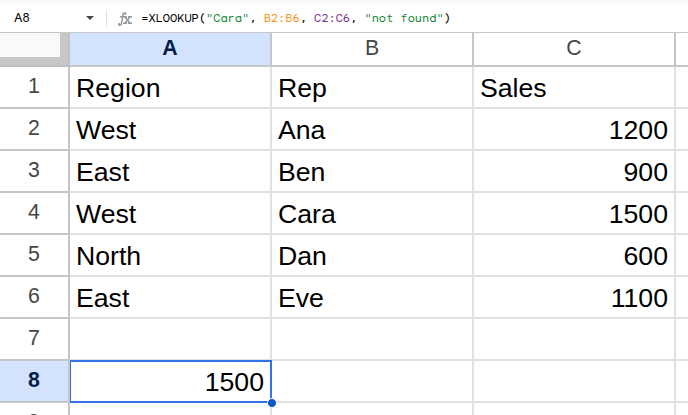
Worked example
| Region | Rep | Sales |
|---|---|---|
| West | Ana | 1200 |
| East | Ben | 900 |
| West | Cara | 1500 |
| North | Dan | 600 |
| East | Eve | 1100 |
=XLOOKUP("Cara", B2:B6, C2:C6, "not found")Returns 1500.
Arguments
| Argument | Required | What it does |
|---|---|---|
search_key |
Yes | The value to look for. |
lookup_range |
Yes | The range to search in. |
result_range |
Yes | The range to return from. Must be the same height as lookup_range. |
missing_value |
Optional | What to return when nothing matches. Without it you get #N/A. |
match_mode |
Optional | 0 exact (default), -1 next smaller, 1 next larger, 2 wildcard. |
search_mode |
Optional | 1 first to last (default), -1 last to first, 2 or -2 binary search on sorted data. |
Gotchas
- 01lookup_range and result_range must be the same height, or you get a mismatch error.
- 02Default match mode is exact — the opposite of VLOOKUP's default, and a common surprise when converting formulas.
- 03Searching a whole column (B:B) against a fixed result range (C2:C6) is a height mismatch. Match them.
- 04Old files opened in Excel 2019 or earlier will not understand XLOOKUP.