VLOOKUP
Run in a real sheetFinds a value in the first column of a range and returns a value from another column in the same row.
VLOOKUP(search_key, range, index, [is_sorted])
VLOOKUP searches down the leftmost column of a range until it finds your search key, then jumps across to the column you asked for and returns whatever is there.
It is the function most people learn first, and the one that causes the most confusion, because two of its rules are unforgiving: the search column must be the first column of the range, and the index is counted from that column, not from column A of the sheet.
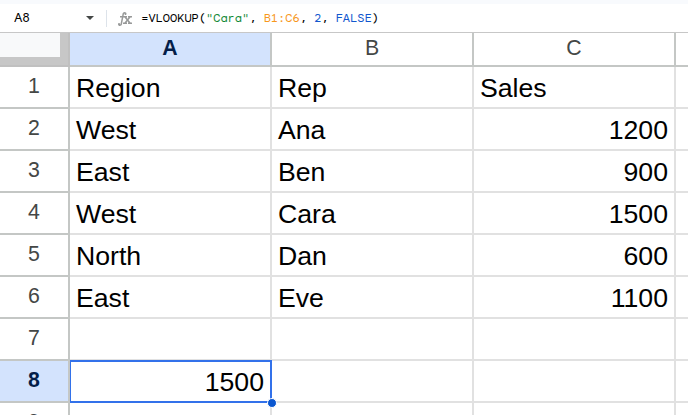
Worked example
| Region | Rep | Sales |
|---|---|---|
| West | Ana | 1200 |
| East | Ben | 900 |
| West | Cara | 1500 |
| North | Dan | 600 |
| East | Eve | 1100 |
=VLOOKUP("Cara", B1:C6, 2, FALSE)Returns 1500.
Arguments
| Argument | Required | What it does |
|---|---|---|
search_key |
Yes | The value to look for, in the first column of the range. |
range |
Yes | The block of cells to search. Its first column is the one searched. |
index |
Yes | Which column of the range to return, counting the first column as 1. |
is_sorted |
Optional | FALSE for an exact match — almost always what you want. TRUE assumes the first column is sorted and returns an approximate match. |
Gotchas
- 01The search key must be in the FIRST column of the range — VLOOKUP cannot look leftwards.
- 02The index counts columns within the range, not columns of the sheet.
- 03Leaving out is_sorted defaults it to TRUE, which silently returns wrong answers on unsorted data. Always pass FALSE.
- 04Inserting a column inside the range shifts what index points at and quietly breaks the formula. INDEX/MATCH or XLOOKUP do not have this problem.
- 05A number stored as text will not match the same number stored as a number.